Notes · Kill SaaS
How I killed the SaaS
Six weeks ago a beauty salon in Kyiv ran on a SaaS product that had quietly stopped evolving somewhere around the second Obama term. Today it’s moving onto software I own, with all its data going back to 2013 carried over and a pile of features the old vendor had been “considering” for as long as anyone can remember.
I won’t name the product. Partly out of politeness, partly because it doesn’t matter. Pick any vertical SaaS that hasn’t shipped anything meaningful in five years. This story is about it too.
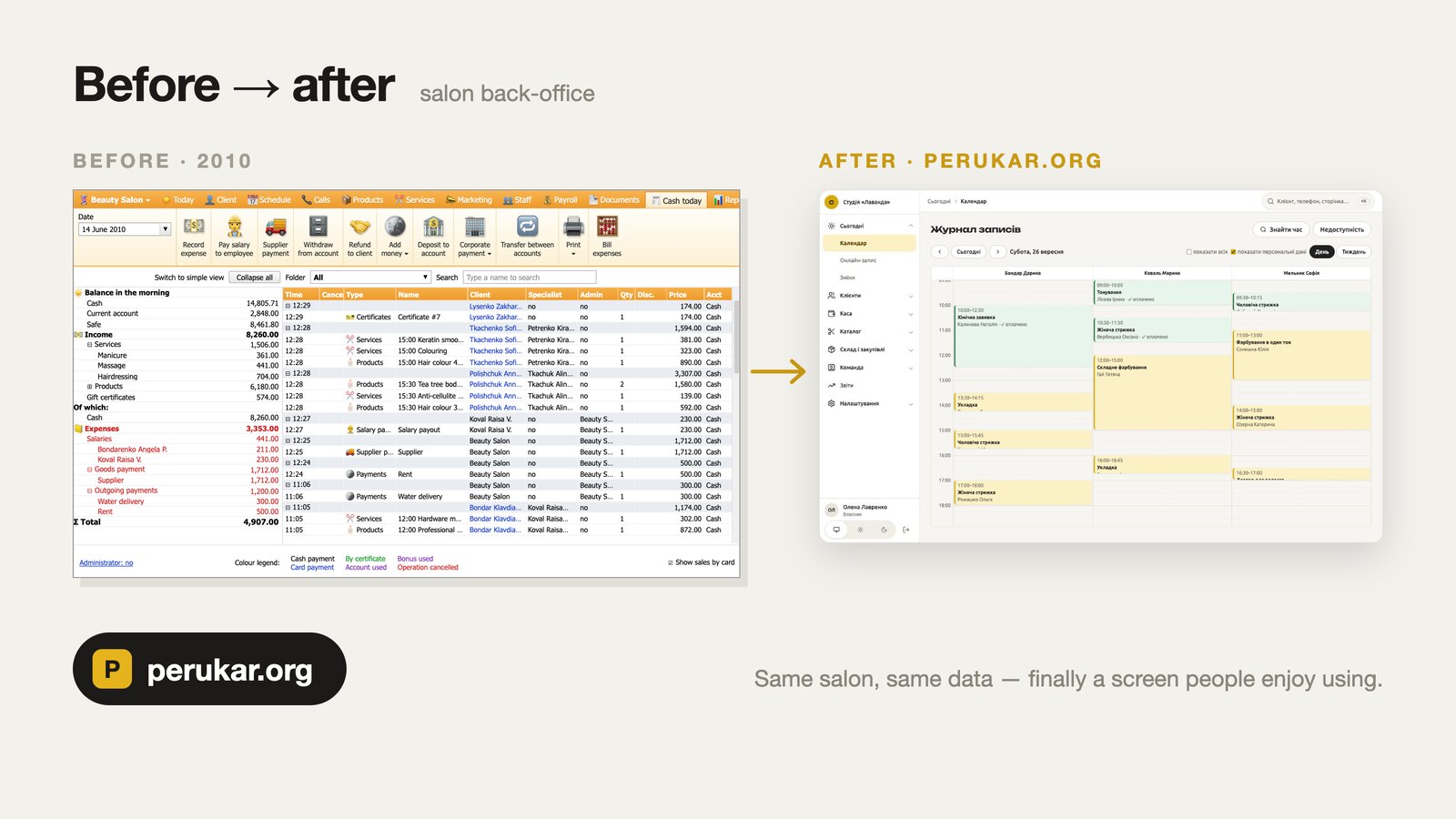
The salon was paying rent on a dead end
To be fair to the old system, it worked. Bookings, cash desk, stock, payroll for the masters: all there, all functioning, in the way a 2009 Windows desktop client functions. The receptionists had developed a muscle memory for its quirks, the way you learn which stair creaks. Feature requests went into a support form and were never heard from again. I assume there’s a folder somewhere.
Leaving wasn’t an option either, or at least that’s what everyone believed. Its clients, visits, hair formulas, prices and payroll, going back to 2013, lived in someone else’s database. People talk about SaaS lock-in as if it were about the software. Nobody is attached to the software. They’re attached to their data and to a decade of habits wrapped around it.
So instead of shopping for another vendor who’d do the same thing in a slightly newer shade of grey, I decided to take the thing apart, understand it completely, and build what the salon actually needed.
Nothing stays hidden from a client who has decided to leave
First obstacle: the data. The vendor was in no hurry to hand over a database snapshot. Of the salon’s own clients. Its own visits. Its own money. We had to remind them whose data it was and mention the word “court” before the dump showed up. Funny how quickly that word improves customer service.
Honestly, we’d have got the data anyway. I’ve done it before.
For another client, Claude Code wrote a script that clicked through the entire order history in a vendor’s web interface, then paged through a catalogue of 250,000 products, and assembled a proper structured database from what it saw on screen. No hacking, no secret API, no violated terms of service. A patient robot with a valid login, doing exactly what a human with that login is allowed to do, minus the coffee breaks.
If your business model depends on customers being unable to leave, I have bad news. If they can see their data on a screen, they can take it home.
Reverse engineering, with Claude Code at the keyboard
I started with three things: the database dump, the vendor’s ancient public API docs, and the desktop app itself. Claude Code did the digging. I asked questions and checked answers, which is a fairly comfortable job description if you can get it.
The schema. 146 tables, because at some point the product also served dentists, gyms and restaurants, and apparently nobody ever deletes anything. Claude Code worked out which tables a salon actually touches and how they relate. It also proved the data was sane: replaying all 172,000 stock movements reproduced the stock levels in the dump to the unit. I was mildly surprised. I’d have bet on at least one rounding ghost.
The screens. The old app lives in a Windows VM on my Mac. Claude Code drove it like a very diligent intern: took screenshots, found buttons with OCR, clicked them, walked through every report and settings page, and wrote down every field, column and formula it could see.
What a button really does. Screens don’t lie, exactly, but they leave things out. The logic is in what gets written. So we restored the dump into a local copy of the database, cut every wire to the outside world (SMS, e-mail, fiscal receipts: nobody wants a test run that texts 15,000 real clients), pointed the app at the copy and let Claude Code press buttons for real. Receive goods, write off stock, move between warehouses, pay a supplier. After each press it diffed the database to see exactly which rows changed. That’s how you learn the actual rules, as opposed to the ones in the documentation, which by then read more like historical fiction.
Out of that came a stack of plain-language specs, one per area of the old product: what the screen shows, what the button writes, and where the new system should stop being stupid. Every feature I built later started from one of them.
A normal interface
The old app was a Windows window full of grids. The new one is a web app that runs in any browser, on the reception laptop and on a master’s phone between clients.
I didn’t recreate the old screens, because the old screens were the problem. I asked who uses each one and for what:
- The administrator gets a day calendar of masters, a cash desk, clients and stock, arranged by task rather than by whatever the database found convenient in 2012. A quick search jumps to any client or section from the keyboard.
- The master gets a phone-first app: today’s visits, today’s earnings, and the visit note as a single full-screen step at the end of each visit.
- The owner gets reports that answer questions in sentences, instead of a wall of numbers to decode with a coffee and a prayer.
The old screens loaded everything at once: all 2,800 products, all 174,000 stock movements, every time, on principle. The new lists load a page and say “showing 50 of 2,842”, like software made this century. Light and dark themes, full keyboard access and a translation for every string of the interface came in as part of the job, not as a roadmap item for Q3 of some unspecified year.
The calendar grid, side navigation and command palette didn’t exist in the UI framework I picked, so Claude Code wrote them as standalone generic packages and I published them as open source. Someone else can suffer slightly less.
The features I always wanted
Once the old rules were written down, the backlog stopped being a wish list and became a to-do list. Some of what the salon now has that the old system never managed in ten years:
- Online booking on the salon’s own page: clients see real free slots with each master’s actual price, and confirm with an SMS code.
- Visit notes after every visit: colour formula, photos, a next-visit recommendation, dictated by voice on the phone, because nobody types with foils in one hand.
- The honest cost of every service, from materials actually used at what they actually cost. It feeds the masters’ payroll and raises a flag when a write-off can’t possibly be right.
- Monthly shift planning with rota patterns, instead of typing each day by hand like a medieval scribe.
- Passkeys and two-factor sign-in, one database per salon, every sign-in audited, encrypted off-site backups. Boring things. Boring things are the ones you miss most.
Integrations fit the salon, not the vendor’s partner page:
- SMS through the salon’s own provider account, with no mysterious markup.
- Fiscal receipts through the government-approved software cash register, with a warning before the offline limit is hit.
- Masters’ visits in Google or Apple Calendar.
- A Telegram bot for staff: schedule changes, new bookings, fiscal alerts.
None of this required anyone’s permission or anyone’s roadmap. I keep half-expecting someone to show up and tell me that’s not allowed.
Moving the data, back to 2013
A new system that loses the history on the way over is just a very expensive way to start from zero. The import was the riskiest part, so it got the most paranoia.
Claude Code wrote an importer from the old dump into the new database: roughly 15,000 clients, 160,000 sale rows, 146,000 payments, 172,000 stock movements and 87,000 payroll rows. The copying was the easy bit. The hard bit was archaeology, working out what the old system actually meant by what it stored:
- IDs that look like UUIDs and then break the standard, presumably to keep you humble.
- “Not set” stored as the smallest representable floating-point number. Someone, somewhere, was proud of that.
- Cancelled receipt lines whose payments, stock movements and payroll rows all had to vanish along with them.
- Cost of goods per movement, kept exactly as the old system recorded it and never recalculated after the fact, because history is history even when it’s wrong.
Every import run checks its own homework: stock levels rebuilt from the imported movements must match the old system’s numbers, and on the real data they match exactly.
Two rules made it trustworthy. An import is refused once staff have started working in the new salon, so it can’t overwrite real work no matter how confident anyone feels. And until the final switch, a mirror re-imports the live data every hour into a test copy, so the staff rehearse on their own clients and their own mess rather than on a cheerful demo dataset where nobody ever cancels.
AI where it earns its place
I didn’t glue a chatbot onto the side and call it an AI strategy. It went into two places where it changes what people actually do.
The owner asks her salon questions in Claude. The new system is a connector she adds once. After that she just asks, from the desktop or her phone: “How did March compare with February?” “Who hasn’t been back in three months, as a table?” Claude answers from her real data. Only the owner can switch it on, access is read-only twice over (in the app and enforced by the database itself), and clients show up under anonymous labels unless she asks for names.
The masters get a coach in Telegram. A master asks “how do I earn more this week?” and gets an answer built from her own numbers: free windows, average ticket, regulars who are overdue by their own rhythm. Once a week the bot pipes up unprompted. The numbers come from the system, the wording from the model, and every number in a reply is checked against the facts before it goes out. If the model invents a figure, the reply is binned and a plain template goes out instead.
That guardrail is worth more than any model. An AI that talks about people’s money does not get to be creative with it.
What six weeks of this taught me
The numbers: first commit on 7 September; six weeks later, 1,387 commits, about 250,000 lines of TypeScript, 626 test files and 90 features, each shipped from its own written spec.
I did not type most of that. I wrote down what things should do, made the trade-offs and checked the output. What made that actually work, rather than produce 250,000 lines of confident nonsense:
- Specs before code. Every feature starts as a short document of “when this happens, then that” scenarios, and those become the tests. Claude Code is excellent at building what’s clearly described and about as good at guessing as anyone else.
- Let the compiler do the code review. One API contract shared by server and web app, strict types end to end. When Claude Code gets something wrong, it mostly fails to build, which is a far better place to fail than in front of a receptionist with a queue.
- Test where the bugs actually live. Fast in-memory tests for logic, a real database for everything a fake can’t express. A green suite with the database switched off is a mood, not evidence.
- Small tasks, many agents. A big change split into phases, each handled by a fresh agent, beats one agent holding forty tasks in its head and quietly dropping the eleventh.
- Look at the real thing. The owner reviews on the live system with real data, not on screenshots. Screenshots are where bugs go to hide.
And the bigger lesson. SaaS lock-in used to stand on two walls: the cost of rebuilding the software and the pain of moving the data. AI coding tools have taken a sledgehammer to both. If your vertical SaaS hasn’t changed in years, someone like me can now take it apart in days and rebuild it better in weeks. And I’m not even that special, which should worry you more than I do.
A SaaS for one
The new system has a name and a site: perukar.org. But I built it for myself, and I’m not trying to sell it.
The next salon will want its own theme park, with blackjack and so on. Every business has its own way of working, and sanding that off is exactly what a generic SaaS does for a living.
So I’d rather build a system like this around one specific business than bet on growing a SaaS that someone can copy tomorrow, using precisely the method I’ve just described, probably on a Tuesday.
That’s how I killed the SaaS. I stopped needing it. Turns out that was the only thing keeping it alive.
If your business pays every month for software it has outgrown, send me what it does today and where it gets in the way, and I will look at it. Another note: a hair-care brand, run from one system.